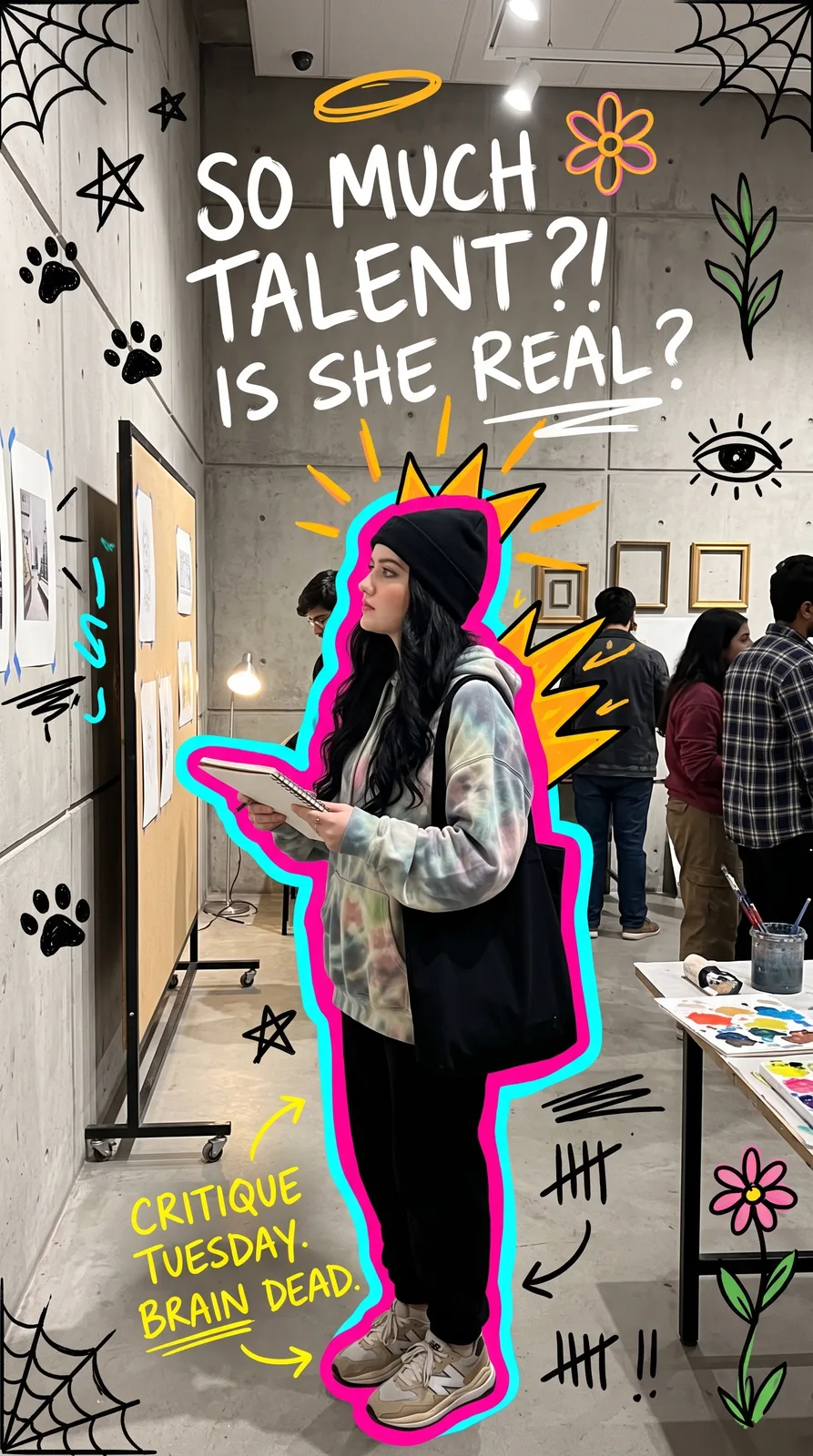
Neon Doodle Gallery Snapshot AI Prompt | Viral Hand-Drawn Photo Edit Style (9:16)
Create a 9:16 image in the "Neon Doodle Gallery Snapshot" style. Subject: [SUBJECT]. Subject action: [SUBJECT_ACTION]. Prop or product: [PRODUCT_OR_PROP]. Location: [LOCATION]. Background elements: [BACKGROUND_ELEMENTS]. Main handwritten text: "[MAIN_TEXT]". Secondary handwritten text: "[SECONDARY_TEXT]". Accent symbol: [ACCENT_SYMBOL]. Wardrobe style: [WARDROBE_STYLE]. Use a realistic candid phone-photo as the base layer. The setting should feel specific and ordinary: visible walls, art, shelves, labels, tables, lamps, posters, people, bags, shadows, grain, and imperfect handheld framing. Draw a loud digital marker layer directly on top of the photo. Wrap the main subject with a thick hot-pink contour and a cyan offset glow. Add yellow-orange monster spikes, horns, rays, fins, or sunburst shapes around the silhouette. Scatter rough hand-drawn symbols around the frame: stars, paw prints, spiderweb corners, halos, abstract eyes, plants, flowers, scribble underlines, tally marks, arrows, hearts, and sticker-like blobs. Place rough uppercase handwritten marker text in open areas, using white, yellow, or lime green. The text should feel funny, personal, distracted, and student-made. Preserve the contrast between a real candid photo and chaotic handmade doodles. Avoid watermarks, usernames, platform logos, creator IDs, app marks, QR codes, clean vector-only illustration, fully illustrated backgrounds, polished ad layout, luxury editorial styling, perfect typography, empty sterile locations, identifiable celebrities, and tiny unreadable text. --- VARIABLES --- [ACCENT_SYMBOL] — star, paw print, spiderweb, halo, abstract eye, plant, flower, underline, arrow, tally mark, or scribble [BACKGROUND_ELEMENTS] — real photo details such as wall art, labels, shelves, posters, tables, lamps, signage, crowds, fabric, shadows, and phone-camera grain [LOCATION] — art gallery, campus hallway, library, studio critique room, classroom, night market, cafe, bookstore, museum, or city wall [MAIN_TEXT] — large hand-drawn caption or emotional headline [PRODUCT_OR_PROP] — notebook, tote bag, coffee, phone, headphones, sketchbook, jacket, snack, poster, camera, book, or exhibition card [SECONDARY_TEXT] — small handwritten notes, repeated words, short joke, date-like label, or study annotation [SUBJECT] — main person, group, student, artist, friend, commuter, shopper, or quiet candid figure [SUBJECT_ACTION] — looking at art, studying, walking, waiting, browsing, reacting, hiding, laughing, or holding a prop [WARDROBE_STYLE] — casual student streetwear, oversized shirt, hoodie, tote bag, loose trousers, jacket, headphones, sneakers, or art-school layers --- NEGATIVE PROMPT --- watermark, username, creator ID, platform logo, app mark, QR code, clean vector poster, fully illustrated scene, polished advertising layout, luxury editorial shoot, sterile studio, perfect typography, perfect sticker sheet, subtle doodles, empty background, corporate mascot, identifiable celebrity, real public figure, tiny unreadable text
How to Use and Adapt This Prompt
This Image formula is optimized for GPT Image. You can run it directly or customize the subject, atmosphere, and styling to match your project.
- Select your AI engine: Switch between the supported models above to get the optimal syntax and parameters for your chosen tool.
- Customize the subject: Replace descriptive elements with your own characters, environments, or branding requirements while keeping the stylistic modifiers intact.
- Tune composition and lighting: Add camera lens details (e.g., 35mm film, bokeh, high aperture) and lighting styles (e.g., chiaroscuro, golden hour, studio diffusion) to guide the AI towards photorealistic depth.
Prompt Engineering & Optimization Tips
- •Aspect Ratios: In Midjourney and Flux, append flags such as
--ar 16:9for landscape or--ar 9:16for mobile wallpapers and video backgrounds. - •Style Consistency: Keep seed values fixed when generating multiple complementary scenes for storyboards or branding assets.
- •Editorial Standard: Every prompt in FindPromps is curated to follow safe, high-quality, and non-infringing generative AI standards.